
Last Updated on 8 July 2024 by Colette
Welcome to the third post in a series about Instagram inspired by a talk that Katie and I gave at Blog On MSI in September. Today I’m talking about How to Use Hashtags on Instagram.

How to use hashtags on Instagram
For about the first year to eighteen months of my time on Instagram, I didn’t really use hashtags. I felt they were a bit attention seeking, looked messy and were fairly pointless. I was wrong.
Hashtags by their very nature are a way of grouping similar images together. They are attention seeking, they’re saying “Look at me, my photo is about this topic too“. Hashtags are a way of introducing your images to a new audience, to people who might not necessarily already be following you.
Some people choose not to use hashtags and are very successful – @Katie_Ellison being a case in point – she hardly ever uses hashtags but has way more followers and likes than I do . . . but generally I think they do the job of getting your images seen so here’s my top tips for using hashtags on instagram:
Research your hashtags
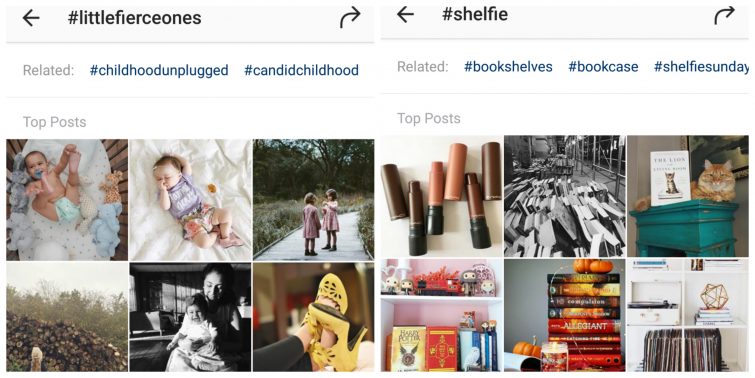
Of course it’s can be quite funny to write a load of really random hashtags and @BrummyMummyof2 does a great job of this. But for the most part you need to use hashtags that people are already using. The best way of finding out which hashtags to use is by looking at images which are similar in style or theme to the one you want to post and seeing which hashtags other people are using. When you click on a hashtag on your phone it will show you all the photos which have been tagged with it but also, across the top, a list of similar hashtags. This is a great way of finding new, related hashtags. Make sure your hashtags are genuinely relevant to the picture you’re posting, ‘clickbait’ behaviour doesn’t translate any better to hashtags than it does anywhere else so tagging your pictures with #instagood or any other random hashtag that doesn’t suit your picture just because it’s a popular hashtag isn’t going to benefit you!
Whilst I’ve just mentioned that you want to use hashtags that people are already using, by the same token if you use ones which too popular you might well find you don’t pick up all that much interaction as your picture very quickly gets lost in that particular hashtag stream, sometimes smaller, active ‘community’ hashtags are more effective.
Vary your hashtags
Don’t just copy and paste the hashtags used by your favourite Instagrammer – for a start they might not all be relevant (I use the hashtag #MummyandBo regularly for pictures of Amy so it wouldn’t make sense for anyone else to use that one!). Furthermore, if you’re all using the same hashtags then people are only ever going to be seeing the same photos – it can be really frustrating when you’re browsing hashtags to see the same pictures popping up over and over again. Mix it up. Find new ones!
Join in with communities
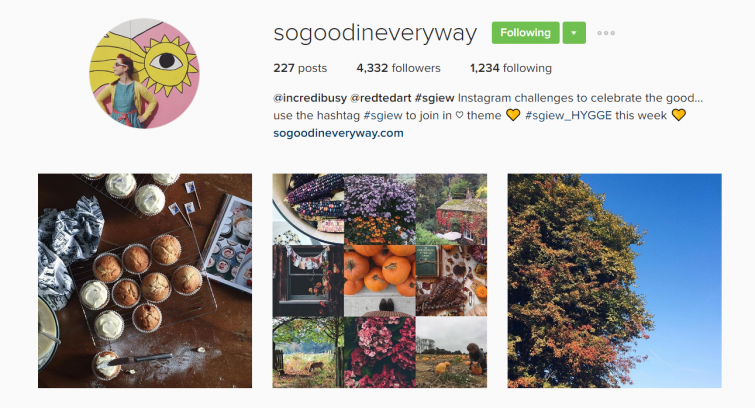
I mentioned this in my post about Building a Following on Instagram – but it’s really important to treat Instagram as a social media. Interact with people and they will interact with you. Use your hashtags to find people who are posting photos in a similar theme to your own and interact with them. There are some gorgeous Instagram communities such as @SoGoodInEveryway which has a weekly themed hashtag or the likes of #DevelopingLife, #LifeCloseUp or #LittleFierceOnes who will regularly choose their favourite images to repost thus sharing them with a new, wider audience.
Interact with your hashtags
This links back to joining in with communities. Once I’ve posted an image, I will go through a couple of the hashtags I’ve used liking and commenting on some of the other pictures featuring the same hashtag. As well as letting Instagram know what sort of picture I’m interested in so it can show me more of them, it also helps build that sense of community and encourages other people to pop back and look at your photo. This is far more effective than just liking loads of random images because checking out the images using the same hashtags as you means you’re more likely to find people in the same “niche”.
Keep your favourite hashtags in your notes
This is a bit of a geeky organisational tip but it really does make such a difference. To get the most out of your hashtags it’s important to add them to your image as soon as possible. If you wait till later to add them they will only show in the hashtag stream at whatever point you posted the original photo. I have groups of (regularly researched and updated) themed hashtags stored in Google Keep on my phone (though I believe it’s possible to set up shortcut keys on your phone) which means I can quickly find them to copy & paste into a comment (obviously editing out any which aren’t relevant or adding in a more specific one). It also means I don’t have to worry about trying to remember my favourite hashtags – they’re all there waiting for me. (Click here for a post about the hashtags I use!)
Captialise your hashtags
This is a really important point for accessibility and inclusivity – if you write your hashtags entirely in lower case (which I have done for a long time purely because I thought it looked nicer) then a screen reader will read the hashtag out as one long nonsensical word whereas if you capitalise your hashtags like this: #HowToUseHashtags , they are naturally easier to read for your audience but also a screen reader can interpret them making your content instantly more accessible for those who can’t easily see or read the words.
Use all thirty hashtags
Instagram allows you to use up to thirty hashtags per image and personally I think you might as well make the most of this! Some people will post all their hashtags into their photo caption (often using a run of full stops on new lines to break this up from their caption) others prefer to add their hashtags into their comments. In part this depends how you post your images to instagram – if you’re pre-writing and scheduling or saving as a draft (a new feature on instagram) then you will need to put them into your caption to make sure they’re there as soon as you publish. If, like me, you post live then you can put them in your comments as soon as you’ve posted. At the end of the day I don’t think it really makes that much difference, it’s all just personal preference.
Watch our for my Instagram Tips post on Which Hashtags to Use for Instagram next Thursday.
Also check out:
Building a Following on Instagram



Great tips. I use to keep mine in a note app on my previous phone, it makes it quicker and easier. Anything for an easy life x
Some excellent tips. I have a shortcut on my phone for my favourite travel hashtags and it really helps (I edit them each time though)
I really should be much more organised when it comes to hashtags – I think because I used to share IG pics across platforms, I didn’t want to spam feeds with a load of hashtags, but now I keep IG pics just on IG, I need to up my game!
Thanks so much for mentioning #LittleFierceOnes Colette. So glad you like our hashtag and really appreciate you joining in fight from the beginning! X
thanks so much for featuring @sogoodineveryway – the #sgiew hashtag is so nice, and yes I would agree with your thoughts on using hashtags – we are always open to new ideas, so if you have any themes you would like covered, do let me know, always open to new guest judges too if you are ever free! #sgiew_OCHRE at the mo… Ali, @incredibusy x
I love Instagram. When i first started using it i was really unsure how to use hashtags but the more i used it, the more i got used to it.
I’m so bad with hashtags, but this definitely helped me understand a little bit more about them. I’m definitely going to use these tips from now on.
These are some great tips – I’m trying to up my hashtag game of late, but I’m not sure I’m doing so well lol.
Some great tips here. I’m currently trying to reach the 1k mark on Instagram so needed some fresh ideas. Jo x
These are fabulous tips, thank you! I’m definitely going to find and follow @sogoodineveryway!
I am trying to grow my instagram and not being all that successful at the minute. There are some great tips here. Thanks for sharing xx
I suck at using hashtags, like you i feel like they’re a bit attention seeking, even though i don’t mind other people using them at all. I think these tips will definitely help me out a bit!
I have found instagram not so blogger friendly recently, so this is a great informative post, xx
There are a select few hashtags I always use but I never know which ones are the most popular ones x
Some great tips here, I must admit I seem to use the same ones all the time
Great Instagram tips, I like looking at the hashtags that people use! 🙂
You’ll enjoy next week’s post then!
So any good tips, I always use hashtags but always looking for new ones to use!
Next week’s post is all about the hashtags I use so you might find a few new ones!
Using the right hashtags is so important. I hate seeing posts with random unrelated hashtags attached.
Absolutely – random unrelated hashtags are just a waste of time x
Thank you so much for the mention of #lifecloseup babes great tips for instagram and getting people to use hashtags the right way and using them more is so important. Always love your feed. 🙂
Great post. I find pictures I tag #Instastyle and #Instafashion get by far the greatest responses.
Great tips here, I always struggle to know which hashtags to use for my pictures x
Thanks for the tips, I had no idea there was the chance to use up to 30 Hashtags, wow!
Fab tips and things I do myself. I do find it hard to use all 30 tags though at times!
Handy Instagram tips here. Thanks for sharing. Bookmarked!
Hashtags are so important on social media, but especially on Instagram. Without them there is no real exposure to your posts.
Great tip for saving the hashtags in notes! I use a few occasionally and that might come handy!
Some more great tips thank you! I need to look more at hashtags! It’s interesting how different things work for different people though isn’t it!
I found this really interesting as I am not on instagram yet and so need to read up on how to do things on there.
Such a brilliant post and one that is definitely going to help me become more organised!
Really great tips here. Hashtags are so important for finding other accounts you might light and vice versa!
Another great post on Instagram. I have been slacking it a bit on IG and it’s nice to see there is a method one can apply. Thanks for sharing and looking forward to the next installment.
Great tips I, like you, only started using hashtags recently. I need to up my Instagram game though!
Some great tips here Colette. I love hashtags, but it’s a constant piece of research to find similar people in the niche if you’re not one or the others. It means I dilute my audience, but I love to see a mix. I find using hashtags with similar geographical people, or english speakers works better. I love some of the flower hashtags, but there seems to be no community with those because a lot are from asia and don’t seem to reciprocate around the hashtag.
I loved your talk with Katie and these follow up posts are great. I’m looking forward to this week’s X
great tips- as ever!
Great post, I adore Instagram!
This is such a good explanation; I had never really thought of Instagram as a community before. I just used to post a photo and hope for the best. I will start to engage more 🙂 I love browsing all the photos anyway 🙂 x
Am I’m glad it was helpful for you! x